So far, we’ve learned about the building blocks of the CSS language - selectors, properties, and values - and the tools and techniques we can use to inspect and manipulate those properties.
In the last section, we saw that we can use properties like outline and background-color to highlight specific elements in our document, making it easier to debug and troubleshoot our CSS layouts - but so far, we’ve only created rules that target a specific element: h1, paragraph, emphasis.
CSS selectors give us an incredibly powerful mechanism to control which elements are affected by our stylesheet rules, but they do have a bit of a learning curve. Let’s start by talking about what selectors actually do.
The House Party Dress Code
Imagine there’s a whole bunch of people at a house party, and our job is to make sure they’re all properly dressed. It’s a very special party - everybody here is either a pilot, a lawyer, a doctor, or a musician. Every guest has exactly one job, and there’s a very specific dress code for this party:
- everybody must wear blue jeans
- musicians must wear black T-shirts
- people who own cats must wear purple hats
- Freddie Mercury must wear a yellow jacket
To translate that into terms of CSS: everybody at the party is an element. All of them. If we want to target everything on the page, we can use the wildcard selector *
Musicians in our example are a particular type of person; this is analogous to targeting a particular type of HTML element, such as a paragraph. Every HTML element has exactly one type: you can’t have a paragraph which is also a button. We’ve already seen how to target elements based on their type, using the associated tag name as the selector.
Cat owners are a particular class of person. Somebody owns a cat, or they don’t – and it doesn’t matter what job they have. Anybody can own a cat. It’s also not mutually exclusive - somebody can can own a cat, and ride a motorbike, and like to watch hockey - and there could be more than one cat owner at the party.
We have classes in HTML as well - any HTML element can have a class attribute, which can contain one or more class names. Class names aren’t part of HTML - you choose your own class names to suit your scenario, and a class name can be anything you like, as long as it starts with a letter, and contains only letters, numbers, underscores and hyphens.
The key thing about classes is that they have a many-to-many relationship to elements. One element can have multiple classes, and a class can be used many times on the same page.
Finally, there’s Freddie Mercury. That’s an identity - Freddie’s unique; you can’t have more than one Freddie. And a person can’t have more than one identity - Freddie can’t also be Taylor Swift.
HTML elements can have an identity too - it’s defined by their id attribute. Like class names, IDs are up to you; you should choose IDs that are relevant to your scenario. An element doesn’t need to have an ID, but it can’t have more than one - and you should never have two elements with the same ID on the same page.
Now, students of rock’n’roll trivia will know that Freddie Mercury is also a musician - and that he owned cats. So if Freddie was an HTML element, he’d look like this:
<musician id="freddie-mercury" class="cat-owner">
and when we apply all our CSS rules, Freddie gets blue jeans because everybody gets blue jeans, a black T-shirt ‘cos he’s a musician, a purple cat because he’s a cat lover, and a yellow jacket because he’s Freddie Mercury.
Wildcards, Elements, Classes and IDs
Switching from house parties back to HTML, let’s take a look at an example of a page that uses all of these concepts:
<!DOCTYPE html>
<html lang="en">
<head>
	<meta charset="UTF-8">
	<title>ToastMaster 9000 - User Manual</title>
	<style>
		* {
			color: navy;
		}

		.warning {
			color: white;
			background-color: red;
		}

		h1 {
			color: white;
			background-color: navy;
		}


		.disclaimer {
			color: gainsboro;
		}

		#features {
			color: darkgreen;
			background-color: palegreen;
		}

	</style>
</head>
<body>
	<h1>ToastMaster 9000 - User Manual</h1>
	<p id="features">Thank you for buying the ToastMaster 9000, your
		state-of-the-art AI-powered bread toasting appliance. The ToastMaster
		9000 includes over 30 browning settings, a digital countdown display,
		and our exclusive AI "Perfect Toast" technology!</p>
	<h2>Getting Started</h2>
	<p>Plug in the toaster and insert your bread. Select the desired browning
		level using the dial.</p>
	<p class="warning">
		<strong>Warning:</strong> Do not insert metal objects into the toaster
		slots.
	</p>
	<p>Alternatively, use the VoiceToast feature. Try saying <q>OK ToastMaster,
			two slices, wholemeal, lightly toasted.</q></p>
	<p class="warning">
		<strong>Warning:</strong> Do not use raised voices or profanity when
		using the VoiceToast feature or ToastMaster 9000 may become angry.
	</p>

	<h2>Cleaning & Maintenance</h2>
	<p>Always unplug the toaster before cleaning. Use a damp cloth to wipe the
		exterior.</p>
	<p class="warning">
		<strong>Caution:</strong> The heating elements may remain hot for several
		minutes after use.
	</p>
	<p class="disclaimer">
		AI-powered toast may contain cat hair, diesel,
		gravel and other materials. Please check for contamination before enjoying.
	</p>
</body>
</html>First up, we’ve got a wildcard rule here to make everything on the page navy.
Next, we target the heading level 1 with an element rule, to give it white text on a navy background. We’ve got a warning class that makes things white on a red background, a disclaimer class that turns text gainsboro - a very, very pale shade of grey - and finally an ID selector: exactly one element on this page will be the features panel for our toaster, and we’d like to draw that in dark green on a pale green background.
ℹ️ HTML is generally case-insensitive, but CSS class names and IDs are not: your class names and element IDs have to exactly match your CSS selectors, including their case. An element with
<p class="Disclaimer"></p>won’t match a rulep.disclaimer {}, so be careful. My own preferred solution to this is to stick to lowercase ASCII for class names and element IDs - lowercase letters a-z, numbers 0-9, and the-
Now, you see how the word “warning” and “caution” is in navy blue here, despite being part of a warning paragraph? We actually have two conflicting rules here. One is the wildcard rule - hey, everything on this page should be navy blue, unless something overrides it. The other is saying “hey, stuff inside warning paragraphs should be white with a red background”.
Those strong tags pick up the red background, because there’s no other rule that would affect their background colour - but the wildcard rule here applies directly to every element, and so it takes precedence over the white text rule, which is inherited from the warning paragraph.
CSS makes it trivially easy to end up with multiple – and potentially conflicting – rules that apply to the same element. We’ve just learned our first rule about how browsers resolve these conflicts: direct selectors always take precedence over inherited selectors. We’ll come back to this when we talk about CSS specificity a little later.
For now, though, let’s fix our warning paragraphs. Edit that rule so instead of the wildcard selector, it targets the HTML <body> element:
body {
	color: navy;
}
The page looks the same - except those “warning” and “caution” elements are white now. The reason is cascading. We’ve said “everything in the body should be navy”, and that rule cascades down… but then when we get to the warning paragraph, that sets a rule that everything should be white, and that second rule wins. The first rule has to cascade from the body element, to the warning paragraph element, to the strong element; the second rule only has to cascade from the warning paragraph to the strong, and shorter cascades are more specific, and therefore have a higher precedence.
We’re going to come back to selectors shortly, because they are phenomenally powerful. To go back to house party example: we could have a rule for anybody who’s standing in the kitchen, a different rule for somebody standing in the kitchen who has a cat, a rule that only applies to a pilot who is standing next to a doctor, a rule that only applies to the first doctor in a room… we can combine selectors in all sorts of combinations and permutations.
For now, there are two more combinations I want to show you before we move on.
Grouped and Nested Selectors
First, you can have a rule with multiple selectors by separating them with commas, known as a list selector or selector group. Here’s a rule that’ll apply to every heading style in a document:
h1, h2, h3, h4, h5, h6 {
    color: green;
}
Second: CSS has also always supported something called descendant combinators. The relationships between elements on a page are often described using terms from genealogy; take a look at this example:
<article>
    <h1>This is a heading</h1>
    <h2>This is a sub-heading</h2>
    <p>This is a paragraph containing a <a>link</a></p>
</article>
We say that the <h1>, <h2> and <p> elements are children of the <article> – and so, conversely, the <article> is their parent. The <a> is a child of the <p>, and a descendant of the <article>; the <article> is an ancestor of the <a>; the <h1>, <h2> and <p> are siblings, because they have the same parent; <h1> and <h2> are adjacent siblings because there’s nothing between them.
We can use these relationships in our selectors. Say we want a rule that says emphasis tags are red, paragraphs are blue, but emphasis tags which are inside paragraphs should be green:
p {
    color: blue;
}

em {
    color: red;
}

p em { /* target em elements which are children of p elements */
    color: green;
}
This syntax has caused a great deal of confusion over the years, particularly when very deep nested selectors are involved:
body.news-article header nav menu li#promo a {
    /* TODO: special style for the link inside the promo
      list item in the menu that's part of the nav inside the
      header on any page whose body has the news-article class.
}
and so, since late 2023, mainstream browsers have supported a new syntax called CSS nesting:
em {
	color: red;
}
p {
    color: blue;
    em { /* target em elements which are children of p elements */
        color: green;
    }
}
According to caniuse.com/css-nesting, nesting is fully or partially supported on over 91% of browsers, so despite being a relatively recent addition to the CSS standard, we’re going to use nested selectors wherever they make sense throughout the rest of this course.
Understanding CSS Specificity
Let’s go back to our party dress code for a second. Imagine we have three rules:
- All guests should wear a blue baseball cap
- Musicians should wear a yellow bucket hat
- Freddie Mercury should wear a red cowboy hat
According to this example, what kind of hat is Freddie going to wear? The rules here create a conflict - Freddie is a guest, and he’s a musician, and he’s Freddie Mercury.
CSS resolves these kinds of conflicts using something called specificity: if there are multiple rules targeting a particular element, the most specific rule wins.
If you look up the documentation for CSS specificity, you’ll find yourself reading about something called selector weight categories, which look like 1-0-0 or 0-2-1 or 0-0-0. You can use the DevTools to see the category weight of any selector by hovering over the selector in the styles inspector:
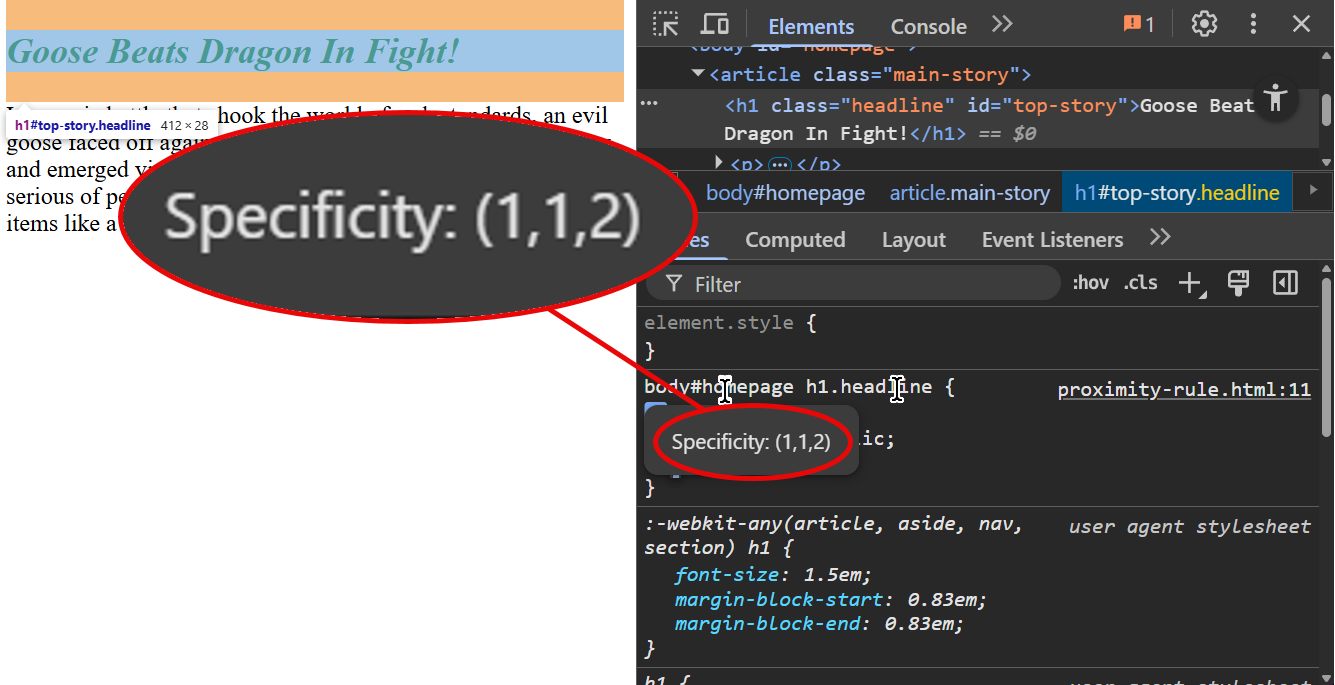
The first column is the ID column column. Every ID selector, like #example, adds one to this column. The second one is the class column; every class name adds one to this column. The third one is the type column - every element type adds one to this column.
Here’s how I think about this. Each rule is an army, made up of highly trained fighting animals, and they’re going to have a battle to see who wins.
The ID column? That’s how many T-rexes 🦖 you’re bringing to the fight. The class column is how many tigers 🐅 you’ve got, and the third column is how many geese 🪿.
You see, if one side has a tiger, it doesn’t matter how many geese the other side’s got - the tiger’s gonna win. If both sides have a tiger, then the geese get involved - but if you bring a tiger, and the other side’s got a T-rex? Yeah. Their T-rex is going to beat your tiger. You got five tigers? Ten tigers? A hundred tigers? T-rex is still going to win. Only way to beat a T-rex is to bring another T-rex… and if they’ve got two T-rexes and four tigers and ten geese, but you’ve got two T-rexes and four tigers and eleven geese? Well, you’re almost evenly matched, but you got one more goose than them - and that one extra goose is going to bring you victory.
Let’s flip that into some CSS rules:
| Selector | IDs | Classes | Types |
|---|---|---|---|
| 🪿 | ||
| 🐅 | ||
| 🦖 | ||
| 🐅 | 🪿 | |
| 🦖 | 🐅 | 🪿 |
| 🪿🪿 | ||
| 🐅 | 🪿 | |
| 🦖 | 🪿 | |
| 🦖🦖🦖 | 🐅🐅🐅 | 🪿🪿🪿🪿🪿 |
In the current CSS standard, and in all modern browsers, type selectors will never override class selectors, and class selectors will never override ID selectors. Or, to put it another way, even if it’s a million geese against one tiger, the tiger’s still going to win.
I believe that this was always the intention of the specificity model, but an earlier version of the CSS spec said that selectors should be compared by adding up each column’s value and then comparing them in “a number system with a large base”. Webkit and Mozilla both decided that 256 was a large base, because this meant they could give the ID, class, and type specificity eight bits each and pack the result into a single 32-bit integer – which meant if you wrote a selector with two hundred and fifty six classes on it, that selector would actually override a single ID selector.
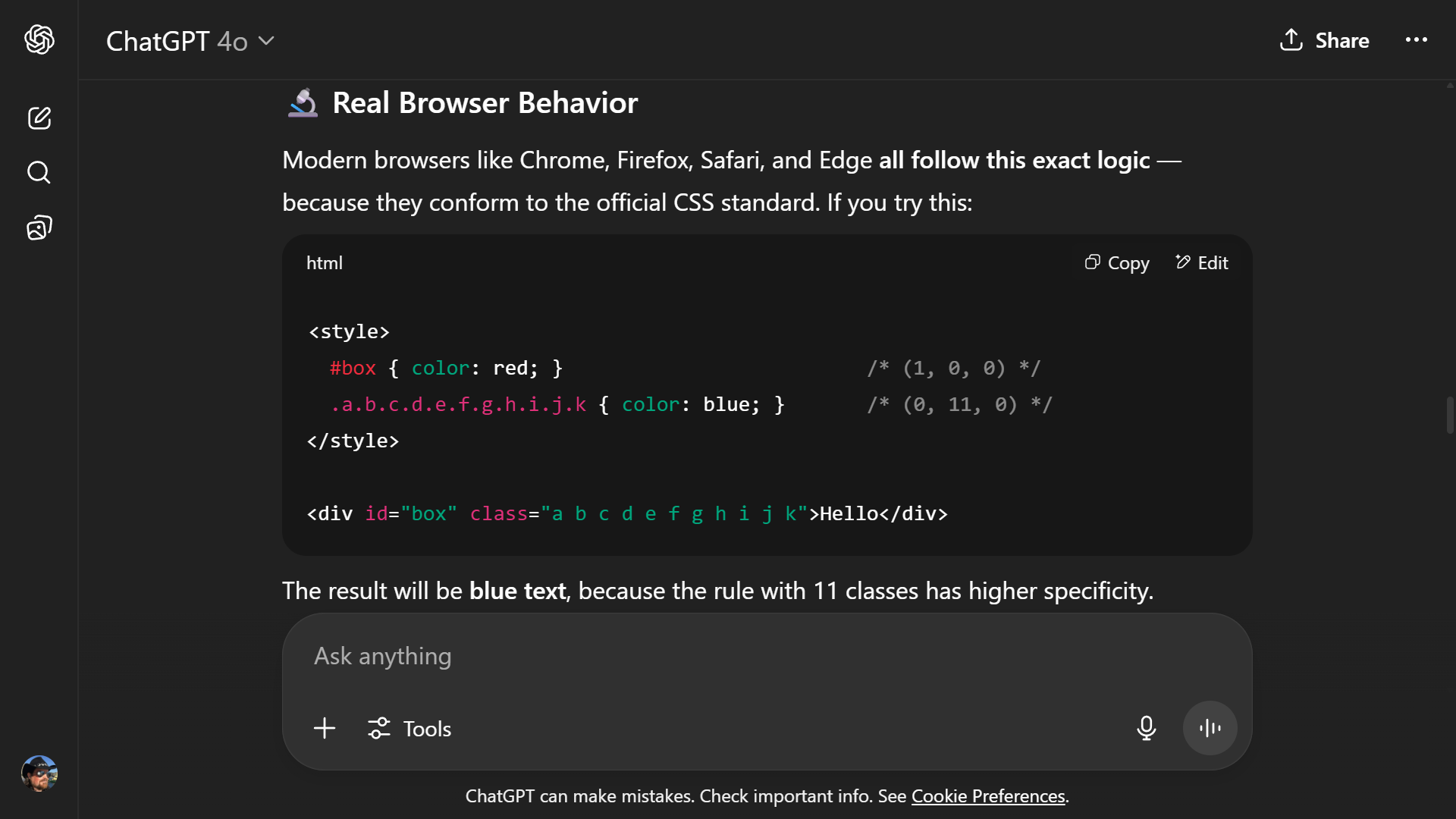
Let’s be clear: this was an edge case nobody was ever expected to find, because there’s no reason why you would ever put 256 CSS classes in a single selector. But somebody found it, posted about it on Hacker News back in 2012, and it somehow became part of CSS folklore that this behaviour was intentional. The exact number differed: some people wrote blog posts about how eleven classes overrides an ID, some people said it was a hundred, some people said it was 256 - but there are so many wrong versions out there that if you search for it, you’ll probably find a dozen wrong answers before you find the right one. At the time I’m writing this, ChatGPT 4o will confidently tell you that eleven classes overrides an ID in CSS selectors - complete with an example:
It’s trivially easy to try this out for yourself. Take a look at css-specificity-with-256-rules.html - that’s a page in which some elements have 256 separate CSS classes, from c001 through to c256, and other elements are nested inside 256 <em><em><em>... tags.
For now, and hopefully for the foreseeable future, ID selectors win over classes, and classes win over types. A T-rex always beats any number of tigers, and a tiger always beats any number of geese.
If two rules end up with the EXACT same weighting, then the browser applies something called the proximity rule, which is a fancy way of saying the last one wins.
<!DOCTYPE html>
<html lang="en">
<head>
	<title>CSS Proximity Rule</title>
	<style>
		.main-story article h1#top-story {
			color: purple;
			font-style: normal;
		}

		body#homepage h1.headline {
			color: green;
			font-style: italic;
		}
	</style>
</head>
<body id="homepage">
	<article class="main-story">
		<h1 class="headline" id="top-story">Goose Beats Dragon In Fight!</h1>
		<p>In an epic battle that shook the world of web standards, an evil goose
			faced off against a Patagonian crimson dragon yesterday and emerged
			victorious. The goose defeated the dragon with a serious of
			perfectly-timed pranks, using innocuous everyday items like a garden hose,
			a can of paint and a bow tie.</p>
	</article>
</body>
</html>Those rules both have one ID, one class, and two types, giving them the same specificity weighting: 1-1-2 (or 🐉🐅🪿🪿, if you prefer that notation), so the bottom rule wins. Change the order of the rules, and now the other rule takes precedence because last one wins.
Selectors, inline styles, and !important
Inline styles — <p style="font-style: italic;">italics!</p> — will usually take precedence over any other rules which target that element. You just showed up to the fight with a dragon 🐉… that’s like a T-rex, only it’s bigger, it breathes fire, and it can fly. It doesn’t matter how many T-rexes the other side has when you’ve got a flying, fire-breathing dragon.
Except… we’re not quite gone. CSS has the !important keyword. That’s the word important with a leading exclamation mark – and yes, in most programming languages, the exclamation mark is logical not, so this means not important, and yes, this is one of the things that the designers of CSS acknowledge was a mistake.
What can defeat a dragon? How about a wizard? 🧙🏼♂️ There you go. !important in CSS is a wizard. Even if you’ve got geese, tigers, T-rexes AND a dragon, the wizard can just turn them all into sheep, or make them vanish entirely. Wizard always wins.
Marking a specific property value with !important will override the ID-class-type selector system, and override any inline style declared by an element:
<style>
p {
    /* Make every paragraph on the website blue, regardless of any
       other selectors that match it */
    color: blue !important;
}
</style>

<p style="color: green;">
    This paragraph will be blue because of the !important rule.
</p>
You should only use !important as an absolute last resort, and even then, use it with a very, very specific selector. The only really valid scenario where you’d use !important is if your site imports a bunch of CSS from somewhere else, which you can’t edit, and you need to override one of their styles because it’s breaking your own code.
If you add !important to an inline style? Well, now you’ve got a wizard riding on a dragon, soaring high above the battlefield, raining down fire and magic spells on everything they see. They’re undefeatable. There is literally nothing you can do to override this rule other than going into the HTML and editing it directly.
<!DOCTYPE html>
<html lang="en">
<head>
	<title>Inline Styles</title>
</head>
<style>
	p {
		color: yellow;
	}

	p.special {
		color: blue;
		font-style: italic;
	}

	p#magic {
		color: red;
		font-style: normal;
	}

	p#weird {
		color: silver !important;
	}

	p#invincible {
		color: skyblue !important;
	}
</style>
<body>
	<p>I'm a paragraph.</p>
	<p class="special">I'm a special paragraph.</p>
	<p id="magic">I'm a magic paragraph.</p>
	<p style="color: green;">I have inline styles!</p>
	<p id="weird" style="color: purple;">I'm a weird paragraph.</p>
	<p id="invincible" style="color: gold !important;">I'M INVINCIBLE!
		Nothing can stop me being gold!</p>
</body>
</html>Review & Recap
- CSS selectors target the element, or elements, on the page to which our rules should be applied
- The wildcard selector
*matches every element on the page, individually - Element selectors match HTML elements based on their tag name
- Class selectors match elements based on their
classattribute- One element can have zero, one, or many classes.
- A page can contain multiple elements with the same class.
- ID selectors match elements based on their
idattribute- Elements cannot have more than one ID
- A specific ID should never appear more than once on the same page.
- Grouped and nested selectors allow us to target elements based on their ancestry
- Conflicting rules are applied based on their CSS specificity
- Element IDs are T-rexes 🦖
- Class names are tigers 🐅
- Element types are geese 🪿
- Inline styles are dragons 🐉
- The
!importantrule is a wizard 🧙🏼♂️ - Tigers always beat geese, T-rexes always beat tigers, dragons always beat T-rexes, wizards always beat dragons, and nothing can beat a wizard riding a dragon.